Your Fanfic, Drawn
ComicInk turns a fan fiction story into finished comic pages — your cast drawn the same way on every page, in any of twelve art styles, with the dialogue lettered into the panels. Paste a chapter you have already written, or start from a premise.
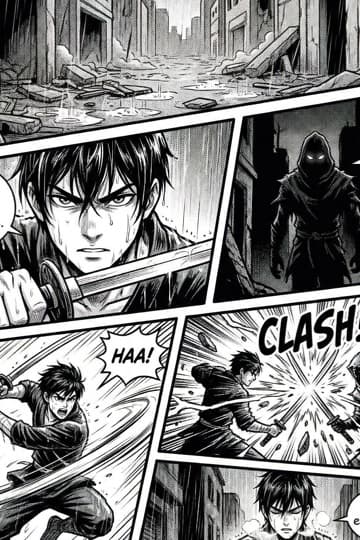
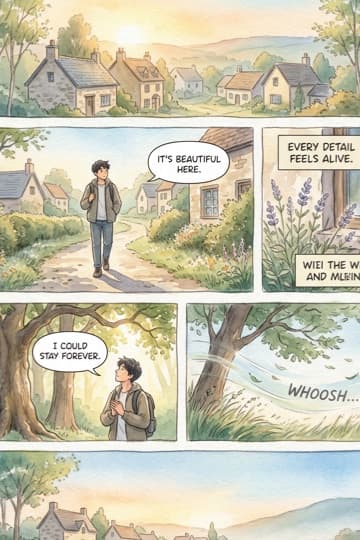
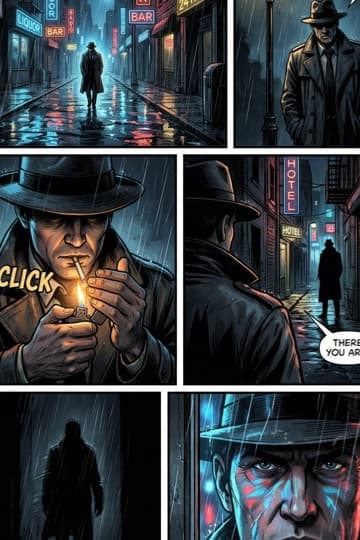
Words Are The Easy Part Now
Generating more prose is a solved problem and half a dozen tools do it well. What nobody in fandom can get cheaply is art — a consistent cast, drawn across a whole chapter, without commissioning an artist or learning to draw yourself.
Twelve art styles
Manga and manhwa for the fandoms that live there, watercolour for quiet character pieces, noir for the angst, cartoon for crack fic. The style is a setting, not a separate tool.
The same face every page
Define a character once — hair, eyes, build, what they wear — and that definition is carried into every panel rather than re-imagined each time. This is the thing that breaks long fics illustrated by hand.
Paste what you already wrote
You do not have to start over. Drop in a chapter you have finished and the AI breaks it into pages and panels, keeping your dialogue as you wrote it.
22 languages
Dialogue can be generated in Japanese, Korean, Spanish, French, Portuguese and 17 more languages — set per issue. Useful for bilingual editions and for fandoms that are not English-first.
Turn it into a video
The same cast and script can become a narrated story video, with a described speaking voice per character. One definition, two output formats.
Publish and share
Every finished issue gets a link that opens in a reader on any device. No account needed to read it, so you can post it straight to a fandom server or a blog.
Chapter To Comic In Three Steps
The whole loop runs in a browser. No drawing tablet, no art skill, no commission queue.
Paste or describe
Drop in a chapter you have written, or describe the story in a sentence and let the AI draft it. Either way you keep editing control over the script.
Define the cast
Name your characters and describe how they look. This is the step that decides whether chapter forty still looks like chapter one, so it is worth doing carefully.
Generate the pages
Pick an art style and render. Pages come back with the art, the panel layout and the lettering already done, and you can regenerate any single page you are not happy with.
Built For Your Own Characters
Fan fiction sits on somebody else's copyright, and an AI tool that pretends otherwise is not doing you a favour. ComicInk is built to illustrate the part that is genuinely yours.
OCs are the sweet spot
Original characters, self-inserts and your own AUs are exactly what the cast system is for — you are defining a look that has never existed, which is where AI generation is strongest.
We will not draw copyrighted characters
Content moderation blocks attempts to generate recognisable characters from existing franchises. That protects you as much as it protects us: art you cannot publish is not worth the credits.
Keep a character sheet
Consistency starts with writing down what must never change. There is a free printable sheet with a turnaround and expression grid if you want to plan it on paper first — the character sheet template →
Fanfiction Generator Questions
Does it write the story, or draw it?+
Both, but drawing is the point. You can paste a chapter you have already written and ComicInk will break it into pages and panels and illustrate it, or you can start from a premise and have it draft the script first. Most people bring their own writing — the art is the part that was previously out of reach.
Can it generate characters from a specific show or book?+
No. Content moderation blocks recognisable characters from existing franchises. The tool is built for original characters, self-inserts and your own alternate universes. In practice this is also the better creative use — a defined original design stays consistent across a long story in a way a copyrighted likeness never could.
Will my characters look the same in chapter 40 as in chapter 1?+
That is the main problem the tool exists to solve. You define a character once and that definition is reused on every page rather than re-imagined, which is what stops the slow visual drift that makes long illustrated fics fall apart.
Is it free?+
A free account includes 100 credits and no credit card is required, which is enough to render your first pages. After that credits come in packs or with a subscription. Reading a published comic needs no account at all, so you can share a finished chapter freely.
How long can a fic be?+
There is no chapter limit. Work issue by issue, the way a serialised comic does — define the cast once and reuse it across every chapter, so the cost per chapter is the art rather than starting over.
Can I post the comic to AO3, Tumblr or a Discord server?+
Yes. You own what you create. Publishing gives you a shareable link that opens in a flipbook reader on any device, and you can export pages as images to post anywhere. Check the destination's own rules on AI-assisted art before posting — several fandom spaces have policies on it.
Stop Imagining It. See It.
Paste a chapter, pick a style, and get illustrated pages back. Free account, 100 credits, no card.