AI Webtoon Maker
Type a story and ComicInk writes the script, then draws and letters tall 9:16 webtoon pages in full colour, with the same characters on every page and dialogue in any of 22 languages. No drawing, and no credit card to start.
Free account • No credit card • 100 credits to start
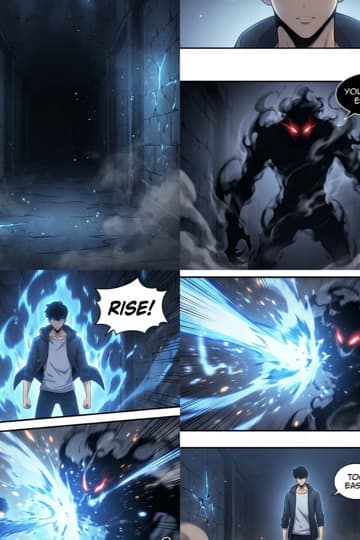
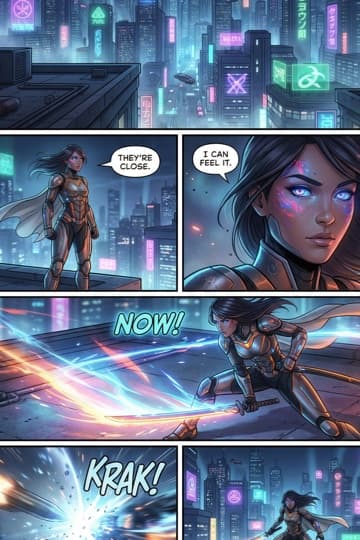
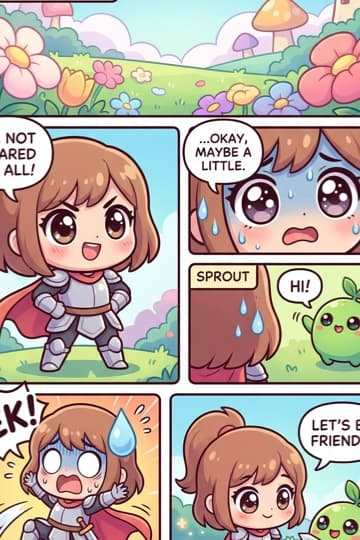
What ComicInk is, what is free, and what it costs
ComicInk’s AI webtoon maker turns a story idea into a full-colour webtoon: it writes a panel-by-panel script you can edit, then draws and letters every page at the tall 9:16 webcomic size, in the Manhwa style or any of 12 art styles, with each character’s look carried onto every page. Download the pages as a PDF or as JPG or PNG images.
| Free to start | Every new account gets 100 credits once, with no credit card. They never expire and do not refresh monthly. |
|---|---|
| First renders | Your first two page or cover renders are not charged. |
| Per image | A page, panel or cover costs 50 credits; a character, asset or world image costs 10. |
| Plans and packs | ComicInk Basic is $9.99 a month for 1,500 credits and ComicInk Plus is $19.99 a month for 4,500. One-off credit packs are also sold. |
| Art styles | Twelve: American Comics, Manga, Manhwa, European BD, Cartoon, Realistic, Noir, Watercolor, Digital Art, Vintage/Retro, Chibi and Pixel Art. |
| Languages | Comics can be generated in 22 languages; the app itself runs in 10. |
| Length | An issue runs 4 to 36 pages, with up to 6 panels per page when you import your own script. |
| Page sizes | Standard US comic, manga (5 × 7.5 in), graphic novel, or 9:16 webcomic. |
| Export | PDF, or a ZIP of JPG/PNG images, at web or print quality; or publish to a shareable reader link. |
| Character consistency | Each character's reference images are attached to every page prompt, together with a written description of their look. It keeps a cast recognisable; it is a mechanism, not a guarantee. |
| Account | A free account is required to generate. Reading the gallery and downloading the printable templates need no account. |
Comparing tools? Our roundup lists each generator's free tier and entry price as read from the vendors' own pages: Best AI comic generators 2026, pricing compared · full pricing
Manhwa made by real creators
Full-colour Manhwa comics that ComicInk creators published to the gallery.


How to make a webtoon with AI
Four steps from an idea to tall, lettered webtoon pages. The form above is already set to the Manhwa style and the 9:16 webcomic page size.
- Describe your episode
Type the premise, the main characters and how the episode should end. A few sentences is enough; a full outline works too.
- Keep Manhwa, or pick another style
Manhwa is preselected for the full-colour webtoon look. Any of the 12 styles can be drawn at the tall webcomic size, and the dialogue can be in any of 22 languages, Korean included.
- Read and edit the script
The AI writes a panel-by-panel script for the whole episode and sets up the cast. Change any line, panel or character before a single page is drawn.
- Draw the pages
Every page is drawn and lettered at 9:16. A page costs 50 credits, and one panel can be redrawn on its own for 50 credits. Read it in the flipbook, publish it, or download it.
Tall pages, not one endless strip
Webtoon platforms show a chapter as one vertical scroll. ComicInk draws a chapter as a run of tall 9:16 pages, each shaped like a phone screen, so they read well on a phone and stack cleanly when you post them.
Phone-shaped pages
Every page is drawn at 9:16, the webcomic page size, instead of a print comic’s 2:3. Panels are composed for that tall frame.
Paced page by page
Each page is a beat of the episode, and the AI lays out the panels on it. Put a reveal at the top of the next page and the reader meets it as they scroll.
Posting to WEBTOON or Tapas
Download the pages as a PDF or as JPG or PNG images and upload them in order. ComicInk does not cut pages into platform slices, so check each site’s upload size before you post.
Writing an episode that keeps people scrolling
A webtoon lives on whether readers come back for the next episode. These habits help, whatever tool you draw with.
Hook on the first screen
Readers decide fast on a phone. Open on a face, a question or something wrong, and save the backstory for later.
One beat per page
Give each tall page one job: a reveal, a reaction, a line that lands. A page that tries to do three things reads as clutter on a small screen.
End on a turn
Close every episode on a question, a reveal or a decision, so the next one has something to answer.
Start with a small cast
Two or three characters are easier to follow in the first episodes, and easier to keep looking the same as the series grows.
Characters keep the same face and outfit because each one’s reference pictures and written look go into every page. The character generator explains how, and the manga maker covers the black-and-white side.
Other AI webtoon makers
If you are weighing ComicInk against another AI comic tool, these comparisons set the two side by side, with each company’s own pricing and features.
Anifusion
A hands-on canvas editor: you lay out each page and generate panels into it, with layouts, LoRA training and layered PSD export. ComicInk writes and draws the whole episode from one idea.
LlamaGen
A broad AI comic suite with vertical webtoon pages and ready-cut WEBTOON and Tapas slices. ComicInk is narrower: it writes an editable script for the whole comic first.
Dashtoon Studio
Dashtoon Studio shut down on 15 August 2026, and Dashtoon’s creation tools moved to an AI video platform. ComicInk still makes comic and webtoon pages.
AI webtoon maker FAQ
Is there an AI that can make a webtoon?+
Yes. ComicInk writes a script from your story idea, then draws and letters full-colour pages at the tall 9:16 webcomic size, in the Manhwa style or any of 12 art styles, with the same characters on every page.
Does ComicInk make one long vertical scroll?+
No. It makes a run of tall 9:16 pages, one image per page, and its reader shows them one at a time. To post an episode as a continuous scroll, upload the pages in order on the webtoon platform. ComicInk does not cut them into platform slices.
Can I post my webtoon on WEBTOON Canvas or Tapas?+
You own the comics you make on ComicInk and can publish or sell them, on every plan. Download the pages as a PDF or as JPG or PNG images, then upload them on the platform, checking its own size limits first.
How do I keep characters the same across episodes?+
Each character’s reference pictures and written look go into every page ComicInk draws, so there is nothing to train. Make the webtoon as a series and each episode is an issue in it, with the same cast.
Is the AI webtoon maker free?+
You can start free: new accounts get free credits and no credit card is needed. A drawn page costs 50 credits whatever its panel count, and a single panel can be redrawn for 50 credits.
Which art style is best for a webtoon?+
Manhwa, the full-colour Korean webtoon look with soft shading and glow, and it is preselected here. Any of the 12 styles can be drawn at the webcomic size, so Digital Art suits fantasy and action, and Chibi suits comedy.
Can I turn a comic I already made into webtoon size?+
Yes. In the comic’s settings, set Page Size to Webcomic. Pages that are already drawn keep their shape until you redraw them; new pages come out at 9:16.
What languages can the dialogue be in?+
The script and the lettered dialogue can be in any of 22 languages, including Korean, Japanese, English, Spanish, Hindi and Chinese.
Start your first episode
Describe the story and ComicInk draws it as tall webtoon pages. Free to start, no credit card, no drawing.